# The Art of Frictionless Billing: Solving the "Checkout Bottleback"
**Introduction: The Chaos of the Evening Rush**
It’s 7:00 PM on a Saturday. Your shop is full. Five customers are waiting at the counter, each with items in their hands. They’re in a hurry. Your staff is under pressure. This is the moment where most billing softwares fail. They lag, they require too many clicks, or they have a confusing layout that leads to mistakes. A "slow" checkout isn't just a minor annoyance; it’s Lost Revenue. A customer who sees a long, slow-moving queue might just leave their items and walk out.
At Visionary Coders, we obsessed over this single moment: The Checkout. We asked ourselves: How can we make a bill generation process so fast that it feels invisible? The answer is the SpeedBill Pro "New Bill" Screen.
**Mobile-First UX: Billing in the Palm of Your Hand**
Most traditional POS (Point of Sale) systems are designed for big dual-screen monitors. But the modern shop owner is on the move. You might be at the warehouse, behind a small counter, or even serving a customer at the door.
- Vertical Optimization: Our "New Bill" interface is Mobile-First. Every button, every input field (like Customer Name, Particulars, and Qty) is designed to be easily "tappable" with a single thumb.
- The "Today/Yesterday" Toggle: Look at the top of our billing screen. We’ve added a simple, smart toggle for "Today" and "Yesterday." Why? Because shop owners often need to back-date a bill for a late-night transaction or a delivery that happened the day before. In a legacy system, changing a date takes 4 clicks and a calendar pop-up. In SpeedBill Pro, it takes 1 tap. This is "User-First" design in action.
**Rapidity in Entry: The Search-to-Success Workflow**
Entering items into a bill should be as fast as sending a text message.
- The "Particulars" Column: We’ve optimized the item entry field to handle long names gracefully. Whether you’re selling a "Luxury Gift Box" or a "Standard Pack of Biscuits," the text remains legible.
- Dynamic Calculation: As you type the QTY (Quantity) and RATE, the AMOUNT updates in real-time. There is no "Calculate" button. We use high-performance React State Management to ensure that the math happens in milliseconds. This prevents "Mental Math Fatigue" for the shop staff, reducing errors during the rush.
- Add Row with a Tap: Adding a new item to the bill is a single-button action. We’ve used a soft blue background for the "ADD ROW" button to ensure it’s visually distinct without being distracting.
**The Psychology of the "SAVE & PRINT" Button**
The most critical part of any billing screen is the "Success Action." In SpeedBill Pro, the "SAVE & PRINT" button is the "Hero" of the screen.
- Prominent Placement: We’ve placed it at the very bottom of the form, spanning the entire width. It’s impossible to miss and easy to hit.
- Vibrant Blue Theme: We’ve used a deep, professional blue (a "Trust Color") for this action. It signals a "Final, Secure" step. When you hit this button, the bill is simultaneously synced to the PostgreSQL Cloud Database and sent to the Thermal Printer (80mm).
- Zero-Wait Logic: While the data is being saved to the cloud, the "Print" command is already being sent to the hardware. This Asynchronous Processing ensures that by the time you’ve handed the change back to the customer, the physical receipt is already printed and ready to be torn off.
**Cleanliness is Efficiency: Zero Clutter**
Many small-business tools are full of "Features" you never use. They have complicated menus for "Inventory," "Tax-Exemptions," and "Supplier Management" right on the billing screen.
- Focused Interaction: SpeedBill Pro’s "New Bill" screen is purely for Billing. We’ve removed all non-essential elements. The background is a clean, minimal white with subtle borders. This reduces "Cognitive Load"—the amount of thinking your staff has to do. They can focus 100% on the customer and the items.
**The Zero-Hardware Paradigm: Any Device, Any Time**
One of the most powerful aspects of our "Frictionless" philosophy is the removal of Hardware Lock-in. Most billing softwares require you to buy specific thermal printers or expensive POS computers. SpeedBill Pro breaks this chain.
Because we use a Browser-Based, Cloud-Native approach, you can run your entire billing operation from a basic Android phone, an iPad, or an old laptop. The "New Bill" screen adjusts itself perfectly to any screen size. This means a street-side vendor with just a smartphone has the same billing power as a high-end air-conditioned showroom. You can start small, with zero hardware investment, and grow into a professional setup with 80mm printers as your revenue increases. This democratization of professional tools is at the heart of everything we do at Visionary Coders.
**Conclusion: Invest in Speed**
Speed is a competitive advantage. When your checkout process is Frictionless, your customers are happier, your staff is less stressed, and your business can handle higher volumes. With SpeedBill Pro, we don't just give you a "form"; we give you a high-performance instrument for your business operations.
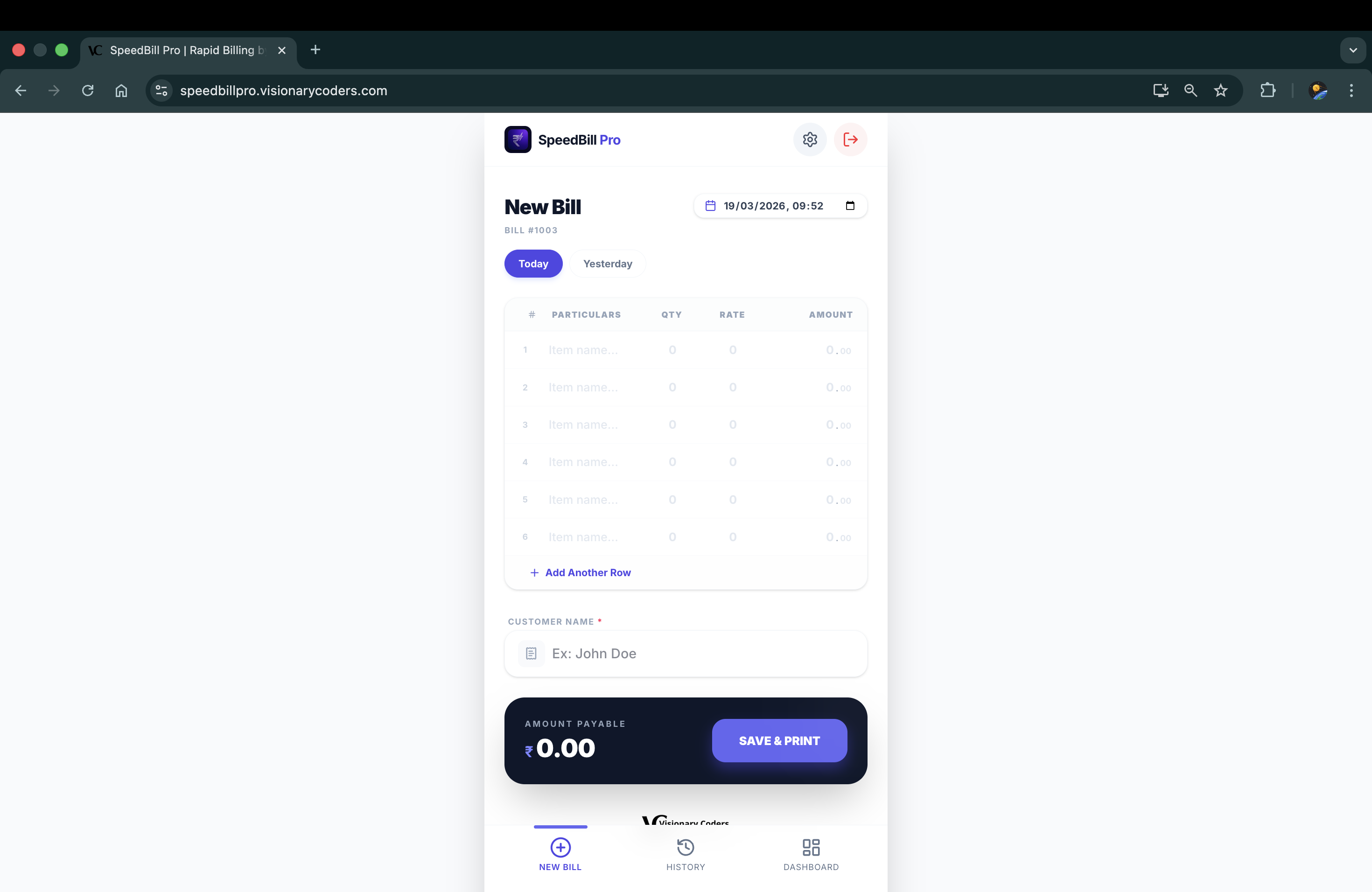
In this screenshot, notice the clean vertical layout of the 'New Bill' form, the 'Today/Yesterday' date toggle, and the prominent blue 'SAVE & PRINT' button. This is efficiency by design.
---
The Visionary Coders Promise:
We don't just build code; we build "Utility." Every pixel on the New Bill screen is there to save you a second, because we know that in business, every second counts. Your speed is our success.